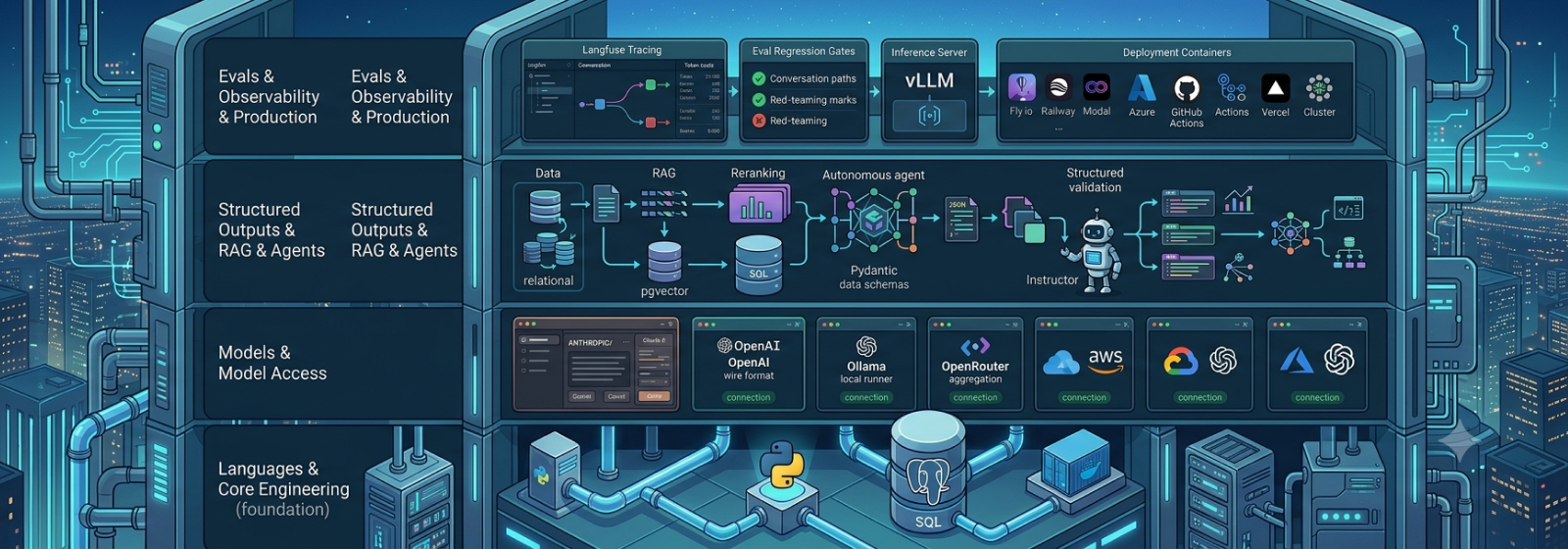
The AI Engineering Stack: What I Use, and Why
Every tool in my AI engineering toolbox, what it actually is, and why it earned a spot — from Python and Postgres to LangGraph and Langfuse.
Aug 7, 2026
Why a Stack Post
Every “learn AI engineering” list I find is either a wall of a hundred logos with no explanation, or a single opinionated blog post that assumes you already know why Postgres beat a dedicated vector database. Neither is useful when you’re actually deciding what to install today.
So here’s mine: every tool I reach for when building AI applications, what it is in one line, and why it earned the slot instead of the five alternatives next to it. Some of these I use daily and know deeply. Others I’m just aware of — enough to not be surprised by them in a job description or a migration doc. I’ve split those apart so you know which is which.
Languages & Core Engineering
This is the boring, load-bearing layer. Nothing here is AI-specific — it’s just good backend engineering, and skipping it is why so many AI prototypes never make it to production.
| Tool | What it is | Why it’s in the stack |
|---|---|---|
| Python | The language | Industry default for AI engineering; every major framework here is Python-first |
| SQL / PostgreSQL | Relational database & query language | App data, vectors, and full-text search all live in one boring, correct database |
| uv | Python package & project manager | Replaces pip/venv/poetry/pyenv with one fast tool; the current standard |
| ruff | Linter + formatter | One instant tool, no config debates |
| pyright | Static type checker | AI apps are schema-heavy; typing catches contract breaks before runtime |
| pytest | Test framework | Standard tests today, eval suites later — same tool carries both |
| Pydantic | Data validation & serialization | The load-bearing library of the field: API contracts, LLM output schemas, tool signatures |
| FastAPI | Async web framework | Pydantic-native and streaming-friendly, so it serves everything I build |
| httpx | Async HTTP client | Raw provider API calls, SSE consumption, concurrent fan-out |
| Docker | Containers | Local infra (Postgres, Langfuse) and the deployment artifact, same file |
| GitHub Actions | CI/CD | Runs tests and eval regression gates on every change |
Pydantic and FastAPI are the two I’d call non-negotiable. LLM outputs are untyped text pretending to be structured data — Pydantic is what turns “the model probably returned JSON” into “the model returned this exact shape or raised an error.” FastAPI just happens to be built around the same library, so the validation you write for your API is the same validation you write for the model.
Models & Model Access
This layer is where most people spend all their attention and it’s the one that churns fastest. My approach: go deep on one hosted API, stay aware of the rest, and treat “which model” as a swappable decision, not an architectural one.
| Tool | What it is | Why it’s in the stack |
|---|---|---|
| Anthropic API | Hosted frontier models (Claude) | The one I study in depth: streaming, tool use, prompt caching, batches |
| OpenAI API | Hosted frontier models | The de facto wire-format standard most tooling speaks |
| Ollama | Local model runner | Run open-weight models (Llama/Qwen/DeepSeek families) on your own machine |
| OpenRouter | Model aggregator | Aware: many models behind one key |
| Microsoft Foundry | Microsoft’s unified AI platform | Enterprise route to frontier models with quotas, content filters, private networking; my first-choice cloud |
| Amazon Bedrock | AWS managed model access | Claude and other models with AWS governance; Knowledge Bases, Guardrails |
| Vertex AI | GCP’s AI platform | Aware: same concepts, third ecosystem |
If you only take one thing from this section: learn one provider’s API properly before you learn five providers shallowly. Streaming, tool use, and prompt caching behave differently enough across providers that skimming all of them teaches you the lowest common denominator, not how any of them actually work.
Structured Outputs, RAG & Agents
This is the middle layer — where “call an LLM” turns into “build an application.” It’s also where I’ve made the most deliberate choices, usually after hand-rolling the naive version first and feeling the pain that the library solves.
| Tool | What it is | Why it’s in the stack |
|---|---|---|
| Instructor | Structured-output library | Pydantic-validated LLM outputs with retries — adopted after hand-rolling the same loop |
| pgvector | Vector extension for Postgres | Vectors + metadata + full-text search in one boring, correct database |
| sentence-transformers | Open-source embeddings & rerankers | Local embedding and cross-encoder reranking without API costs |
| Cohere Rerank | Hosted reranker | The biggest retrieval-quality jump per line of code |
| LangGraph | Agent orchestration framework | My primary framework: durable state, human-in-the-loop, streaming |
| MCP | Model Context Protocol | The open standard for exposing tools to AI apps; worth building a server for |
| Pydantic AI | Type-safe agent framework | Aware: the lighter-weight alternative worth watching |
| Claude Agent SDK | Agent harness SDK | Aware: the production harness behind Claude Code |
Two picks here I’d defend hardest. First, pgvector over a dedicated vector database — unless you’re at a scale where that’s genuinely the bottleneck, running vectors next to your relational data means one fewer system to operate, back up, and reason about consistency for. Second, Cohere Rerank — of everything in a RAG pipeline, adding a reranking pass is the highest-leverage change you can make for the least code.
Evals, Observability & Production
The layer that separates a demo from something you’d trust with real traffic. This is also the section most tutorials skip entirely, which is exactly why things break in production and nobody can say why.
| Tool | What it is | Why it’s in the stack |
|---|---|---|
| promptfoo | Eval & red-team CLI | Config-driven eval suites wired into CI; automated red-teaming |
| DeepEval | Pytest-native eval library | Prebuilt LLM/RAG metrics (faithfulness, relevancy) inside the pytest you already use |
| Ragas | RAG evaluation library | Aware: RAG-metric vocabulary; overlaps DeepEval |
| Langfuse | LLM observability platform | Open-source tracing, cost tracking, datasets, feedback capture; self-hostable |
| LiteLLM | LLM gateway/proxy | One choke point for budgets, rate limits, fallbacks, model routing |
| vLLM | Inference server | The standard for self-hosting open-weight models on GPUs |
| Redis + arq | Queue + async worker | Background jobs (ingestion, long agent runs) off the request path |
| Fly.io / Railway | Container hosting | Simple, cheap deploys for containerized apps |
| Modal | Python-native serverless + GPU | Serverless GPUs for vLLM legs and spiky workloads |
| Azure AI Search | Managed retrieval service | The managed version of the RAG stack you built by hand |
| Azure Container Apps | Serverless containers on Azure | My primary cloud deploy target (Azure-first) |
Langfuse is the one piece of this entire stack I’d call mandatory, not optional. Without tracing, “the agent gave a bad answer” is a mystery. With it, it’s a five-minute investigation: which prompt, which retrieved chunks, which tool call, which token cost. Evals tell you something is wrong in aggregate; tracing tells you exactly what happened in the one conversation your user is complaining about.
How I Actually Use This List
Not everything here gets equal attention. The pattern that’s worked for me:
- Primary tools — Python, Postgres, Pydantic, FastAPI, the Anthropic API, LangGraph, Langfuse — I go deep on: real projects, not just tutorials.
- “Aware” tools — OpenRouter, Vertex AI, Pydantic AI, Ragas — I read the docs, skim a comparison or two, and move on. The goal is recognizing them, not mastering them.
- Everything gets revisited when the job actually calls for it. Reaching for vLLM before you’ve ever needed to self-host a model is optimizing for a problem you don’t have yet.
That’s the whole stack. If you’re building your own version of this list, the only rule that matters is: pick one thing per layer, go deep enough to feel its edges, and stay aware of the rest so nothing surprises you later.